


myQ Community
4.4521.00 Reviews
App Specs
- Version
- 7.0.45.478333
- Updated On
- License
- Free
- Downloads
- 100,000+
- Developer
- The Chamberlain Group LLC
- Categories
- Lifestyle
- Platform
- Android
Screenshots
 Analysis by AppCompare
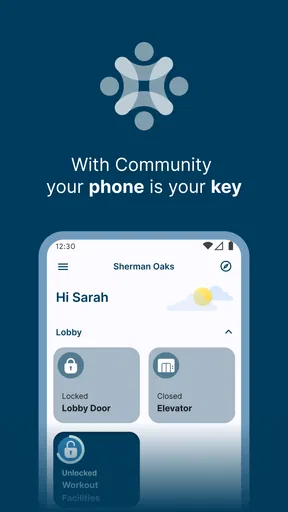
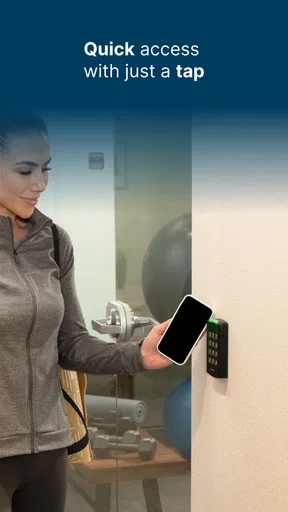
Living in a managed apartment or condominium often means that access is handled differently from everything else in daily life. A key fob, a gate remote, a visitor code, and a property manager’s instructions can all belong to separate systems. myQ Community is designed to bring that access experience into one mobile app for residents and property managers. After using it as a lifestyle tool, I found its value less about adding entertainment and more about reducing the small moments of uncertainty around entering a shared property.
The app is free and comes from The Chamberlain Group LLC, a company already associated with connected access products. Its focus is narrow: it is not a general smart-home dashboard or a replacement for every building-management service. Instead, it is intended for communities where the property has enabled myQ Community. That distinction matters, because the app’s usefulness depends heavily on how the building has configured the service.
How myQ Community fits into everyday building access
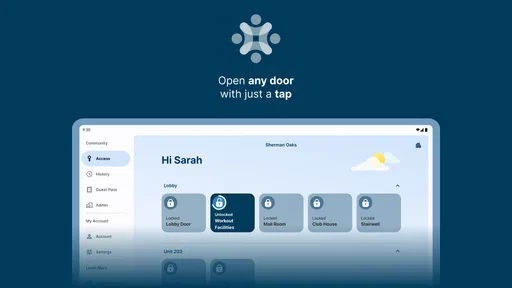
The current experience makes the most sense when I think of the app as a digital layer between residents and a property’s access points. Rather than treating the phone as a universal remote for every door everywhere, the service connects a resident with the community they belong to. Property managers can use the same ecosystem to organize access, while residents use it to interact with the permissions made available to them.
That setup is particularly useful in buildings with shared entrances, vehicle gates, parking areas, or other controlled points. In a normal day, the benefit may be subtle. I do not need to search for a physical remote, remember which access method applies to a particular entrance, or explain the whole building’s system to a guest from scratch. The app gives the resident a single place to check the access experience that the property supports.
There is an important practical limitation here: installing the app alone does not transform an ordinary building into a myQ Community property. A resident still needs the community’s participation and the appropriate account or invitation process. If a landlord, condominium board, or management office does not use the service, there may be little for the app to do. I would check with the property office before treating it as a guaranteed solution.
For the right building, the appeal is easy to understand. A resident can keep the access workflow on the same device used for messages, calendars, and everyday communication. That can be more convenient than carrying another remote, although it also means the phone’s battery, operating system, and account access become part of the entry routine.
A realistic arrival scenario
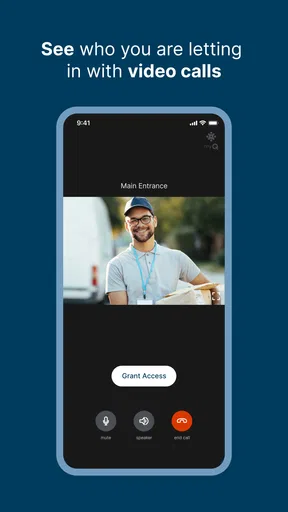
Imagine coming home with groceries while a visitor is waiting at the property entrance. With a conventional arrangement, I might need to find a key fob, call the resident from inside, or explain where a temporary code should be entered. In a community using the service correctly, the app can make the resident’s side of that process more organized. I can open the relevant access experience on my phone and handle the interaction without switching between a building notice, a separate remote, and a long message thread.
Worth Reading Before You Choose

EA SPORTS FC Mobile 26 Is a Bigger Football Game, but It Takes Time

Flipboard Shows What News Apps Must Do Beyond the Feed

Switching to Android Auto Means Rethinking Your Driving Routine

Google Calendar Makes a Crowded Week Easier to Manage

Ludo King Makes the Most of the Minutes Between Plans

Baby Panda World Brings Quick Play to Modern Phones, but Its Game Library Feels Busy
The advantage is not that every arrival becomes automatic. The advantage is that the access responsibility becomes easier to understand. I know which app is associated with the community and where to begin. That is a modest improvement, but it is exactly the kind of improvement that can matter when I am carrying bags, arriving late, or helping someone who is unfamiliar with the property.
I also see a useful role for residents who frequently move between several shared areas. A building may have different expectations for the main entrance, parking access, and visitor handling. Keeping those relationships inside one community-oriented service can reduce the chance of relying on an outdated note or a physical control that was never intended for a particular entrance.
What the latest version tells me about the product’s direction
The current version is 7.0.45.478333, and the app was released on September 4, 2020. Those details suggest a product that has had time to develop beyond an initial access experiment. I would not interpret a version number by itself as proof of a specific feature or redesign, but it does show that the app is part of an ongoing software product rather than a one-off companion utility.
For existing users, that evolution is likely more important than the original release date. A community access app must remain usable as phones, operating systems, and property workflows change. The current build supports devices running operating system version 10 or later, so anyone using an older phone should check compatibility before planning around it. For people with a supported device, keeping the app updated is sensible because access software is not something I want to leave untouched for years.
The app’s public reception also indicates that it has found a real audience. It holds a 4.4 average from around 6,700 ratings, with more than 500 written reviews, and has passed 100,000 installs. I read those figures as evidence of established use rather than a guarantee that every resident will have the same experience. Access apps are unusually dependent on building setup, and a smooth result in one community does not automatically translate to another.
Its Everyone age rating is appropriate for the basic purpose. The app is about residential access and community participation, not mature entertainment. That makes it easier to recommend across a household, although the person using it still needs to understand that access permissions are practical responsibilities rather than ordinary social-app settings.
Where the app is strongest for residents
My favorite aspect is the way it can reduce fragmentation. Residents often receive building information through email, printed notices, text messages, and conversations with staff. Access itself may then be handled by a separate remote or code. A community-focused app cannot solve every communication problem, but it gives the access portion a recognizable home.
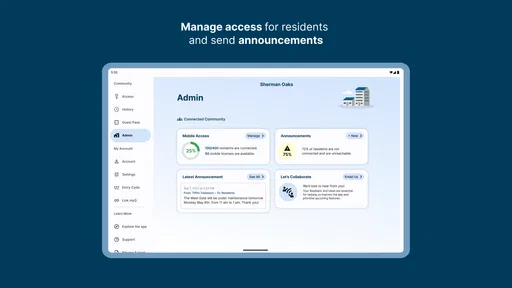
Another strength is the relationship between the resident and the property manager. When access is handled through a shared platform, the management side has a more direct way to organize the resident experience than if every person uses an unrelated method. That does not mean the app replaces human support. It means the digital tool can sit inside the building’s existing process instead of being an isolated personal shortcut.
I also appreciate that the app is free to download. That removes one barrier for residents who are simply trying to use a service their property already provides. The more important cost question is not the download price but whether the community has adopted the system and whether the resident’s access arrangement is properly configured. A free app is not useful if the building does not support it.
For people who regularly host guests, the app can also be more practical than relying entirely on a permanent physical credential. The exact experience will depend on the community’s setup, so I would not promise a particular visitor flow to every reader. Still, the underlying idea is valuable: access can be managed in a way that is easier to revisit and adjust than handing out a key or explaining a complicated entrance routine.
Small workflows that make a noticeable difference
One useful habit is to test the app before an urgent arrival rather than waiting until I am standing outside with a guest. I would open it while at home, confirm that the correct community context is available, and make sure I understand the normal access sequence. This is especially important after moving into a new property, changing phones, or reinstalling the app.
A second habit is to separate access troubleshooting from general phone troubleshooting. If the app does not behave as expected, I would first check whether the issue concerns the phone or the property account. If other building residents are experiencing the same problem, contacting management is likely more productive than repeatedly reinstalling the app. If the problem appears limited to one device, then checking the account state and app compatibility becomes more reasonable.
A third practical insight is to avoid making the app the only possible plan for an important arrival. A phone can lose power, connectivity can be inconsistent, or a property may change its access configuration. I would keep the building’s support contact and any approved backup method available, particularly when returning late at night or coordinating access for someone who cannot wait outside.
These are not glamorous features, but they are the details that decide whether an access app feels dependable. The best digital workflow is one I understand before I need it, and myQ Community benefits from that kind of preparation.
What property managers should consider
From a property manager’s perspective, the app is more interesting than a simple resident convenience tool. It creates a shared environment in which access can be connected to the community rather than handled entirely through individual devices and informal instructions. That can make onboarding easier for new residents, especially when several entrances or shared areas are involved.
However, the software does not remove the need for clear building procedures. Residents still need to know whom to contact when a permission is wrong, when a guest cannot enter, or when a device is replaced. A manager who introduces the app without explaining the enrollment process may create confusion instead of reducing it. The strongest implementation would pair the app with concise move-in instructions and a clear support route.
Managers should also think about residents with different levels of technical confidence. Some people will immediately understand a digital access workflow; others will prefer a physical credential or need help during their first use. In my view, myQ Community works best as an added access option within a thoughtful property process, not as an excuse to eliminate every alternative on day one.
Where it may fall short
The biggest weakness is dependency. The app is only as useful as the community integration behind it. A resident cannot independently configure every part of the access experience, and that may feel limiting to someone accustomed to smart-home products that can be installed and customized personally.
It is also not the right choice for someone looking for a broad lifestyle platform. The category is lifestyle, but the actual purpose is specialized residential access. I would skip it if I wanted home automation, package tracking, building chat, maintenance requests, or a complete resident portal in one place. Those needs may require other tools, even when a property also uses myQ Community.
Phone dependence is another trade-off. A digital credential is convenient when the phone is nearby and ready, but it adds another point of failure compared with a simple physical key or fob. People who frequently forget to charge their phone, share devices, or prefer not to use a mobile app for entry may be happier with an approved physical alternative if their property offers one.
There is also a learning curve when a building has several access rules. The app may centralize the experience, but centralization does not automatically make every rule obvious. I would still read the property’s instructions carefully, especially around guest access and shared entrances. The app should support the building’s policy, not encourage residents to guess how permissions work.
How it compares with familiar alternatives
The simplest alternative is a key or key fob. Physical access is easy to understand and does not require a charged phone, which remains a meaningful advantage. On the other hand, physical credentials can be inconvenient to replace, lend, or manage when a resident needs to coordinate access for another person. myQ Community is more flexible in a digitally organized property, while a fob is often more dependable as a basic backup.
A standalone gate remote offers a similar comparison. A remote can be fast and familiar, but it normally handles one narrow function and gives the resident less of a connection to the community’s broader access process. The app is preferable when the property wants access to be tied to resident records or managed digitally. The remote is preferable when the only goal is opening one gate without involving a phone.
Some buildings use a general resident portal for announcements, payments, maintenance, and access. That kind of portal may be better for residents who want one place for every property task. myQ Community has a clearer specialty: it concentrates on access rather than trying to become the entire relationship between resident and management. I see that focus as a strength when the building already has separate systems for other services, but as a weakness when residents expect a single comprehensive portal.
Finally, a smart-home platform may appeal to people who want to combine locks, lights, cameras, and routines. That is a different ambition. myQ Community is more appropriate when the property itself controls the access framework and the resident needs a supported way to participate. Choosing between them depends less on technical enthusiasm and more on who owns the access decision: the individual household or the managed community.
What existing users should expect from continued development
The current build gives existing users a reason to keep the app maintained, but I would judge future changes by practical reliability rather than by a long feature list. For this type of product, the most valuable improvements would be clearer enrollment, easier recovery after a phone change, transparent access status, and straightforward guidance when a community-side setting needs attention.
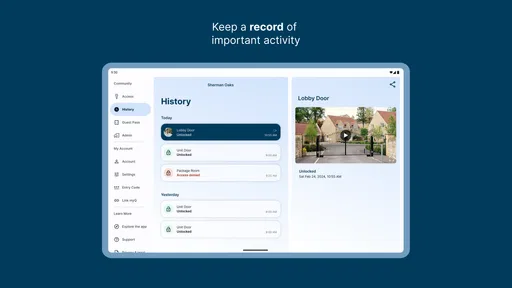
I would also watch how well the experience handles transitions. Moving apartments, changing residents, replacing a phone, or updating a guest arrangement are more revealing than a normal successful entry. An access app earns trust when it makes those unusual moments understandable instead of leaving the resident to contact several people and repeat the same explanation.
At the same time, I would not expect every future update to benefit every user equally. A change intended for property managers may be invisible to a resident, while a resident-facing improvement may depend on the building enabling it. That is why I would separate the app’s software progress from the community’s own implementation. Both have to work together.
My recommendation for the right resident
I recommend myQ Community to residents whose property actively uses it and who want a more organized way to handle community access from a phone. It is especially suitable for people who regularly deal with shared entrances, parking gates, or guest arrivals and would rather not depend on several disconnected access methods.
I would be more cautious if you are moving into a property and have not yet confirmed how the service is used there. Ask the management office how residents are enrolled, which access points are covered, what happens if the phone is unavailable, and where support is handled. Those questions will tell you more about your likely experience than the app’s download page alone.
Overall, I see this as a focused and sensible lifestyle app rather than an all-purpose resident platform. Its best quality is the possibility of making managed-property access feel less scattered. Its main limitation is that the building remains part of the product: community setup, policies, and support shape the result. If that relationship is already in place, the free app is worth trying. If you need independent smart-home control or a complete property-management portal, another solution will likely suit you better.
My final view: myQ Community is most convincing when it quietly removes friction from an access routine I already have. I would install it for a supported community, test the workflow before relying on it, and keep an approved backup method available. Used with those expectations, it can be a practical bridge between residents and property managers without pretending to solve every part of community living.
Pros
- Conveniently manages doors
- gates
- and shared building access in one app.
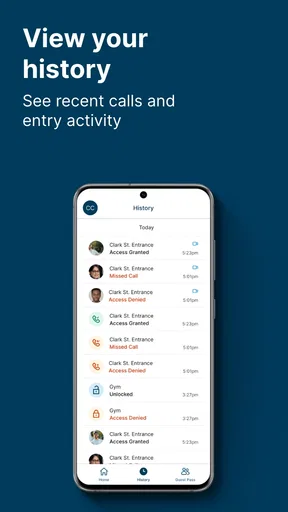
- Real-time access notifications improve awareness of entries and exits.
- Digital keys can reduce the need for physical fobs or spare keys.
- Useful for coordinating access with family members
- guests
- or service providers.
- Supports a more organized access experience for participating communities.
Cons
- Features depend heavily on your property’s myQ Community integration.
- Some access controls may require an active invitation or administrator approval.
- Internet or Bluetooth issues can delay commands and notifications.
- Not all buildings offer the same devices
- permissions
- or available features.
- Privacy-conscious users may dislike sharing access activity with property managers.
FAQs for myQ Community
What is myQ Community and what can I use it for?
myQ Community is a resident-focused app designed for people living in participating apartment communities or managed properties. After signing in, residents may be able to view community updates, receive important announcements, manage deliveries, access building-related services, and communicate with property management. The exact tools depend on whether the user’s community supports myQ Community and which features the property administrator has enabled.
Do I need to live in a participating community to use myQ Community?
Yes, access is generally connected to a participating residential community rather than being available as a fully independent app for everyone. During registration, you may need to locate your property, confirm your residence, and use information supplied by the management office. If your community does not appear, or your invitation has not arrived, contacting property management is usually the best way to verify eligibility.
What features does myQ Community offer to residents?
The available features can vary by property, but myQ Community may provide delivery notifications, package-management tools, community announcements, resident communication, amenity or service information, and other building resources. Some communities may also connect the app with myQ smart access or delivery solutions. Because management controls the setup, two residents in different properties may see different menus and capabilities.
Is myQ Community free to download and use?
The app can generally be downloaded without an upfront charge, but that does not necessarily mean every service connected with it is free. Community fees, delivery-related charges, premium amenities, or third-party services may be handled separately by the property or provider. Before relying on a particular feature, review the terms shown in the app and ask your management office about any costs.
What should I do if I cannot log in or do not receive community notifications?
First, confirm that you are using the email address or phone number associated with your resident account, then check your internet connection and install any available app updates. Make sure notifications are enabled in both myQ Community and your device settings. If the problem continues, try the app’s account-recovery or support options. Property management may also need to correct your resident profile or resend an invitation.


